Docs & FAQ
Everything about running OneTapAnswer, in the order you are likely to need it.
Setup guide
The installer does the whole setup. You will not see a terminal, a package manager or a configuration file at any point.
- Run the installer. It puts OTA in the system tray and starts it when you log in.
- Choose an AI. ChatGPT is marked Recommended and works on a free ChatGPT account; Gemini works on a free Google account; Claude needs a paid Claude plan. One is enough — add the others later. OTA installs what it needs behind a progress bar.
- Authorise it. One tap opens your browser. Sign in to the engine you chose and come back — the installer notices on its own.
- Sign in to OneTapAnswer. Google sign-in, which is what carries your 10 free answers and, later, your plan.
- Done. The last screen shows your hotkey and offers to change it.
First-run warnings
The installers are new and not yet signed, so each system asks you to confirm the first time you open OneTapAnswer. This is what each one says, and the way past it.
Windows
OneTapAnswer is new and doesn’t carry a publisher’s signature yet, so Windows can’t say who made it and asks you to confirm. It’s the warning every new app gets.
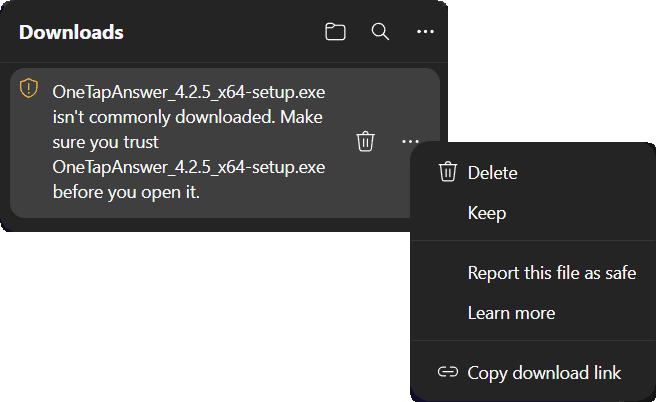
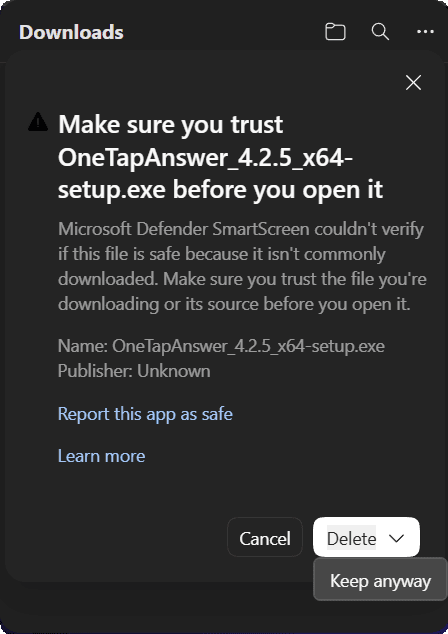
- Microsoft Edge holds the file back: “isn’t commonly downloaded.” Point at it, press … and choose Keep, then open the arrow beside Delete and choose Keep anyway. Chrome downloads it without asking.
- If a blue window says “Windows protected your PC”, press More info, then Run anyway.
- Windows asks whether to let “an app from an unknown publisher” make changes: press Yes. It installs for everyone on the computer, which needs that permission.
Smart App Control is stricter. If Windows says it blocked OneTapAnswer, there is no way past it on that computer yet: that setting only runs signed apps.
macOS
OneTapAnswer isn’t notarised by Apple yet, so the first time you open it macOS stops it and asks you to allow it in System Settings.
- If Safari asks whether to allow downloads on onetapanswer.com, press Allow.
- Open the downloaded file and drag OneTapAnswer into Applications.
- Open it from Applications. When macOS says it can’t verify OneTapAnswer, press Done — not Move to Trash.
- Open System Settings → Privacy & Security, scroll to the line about OneTapAnswer and press Open Anyway, then Open Anyway again in the box that follows, and confirm with your password.
- When OneTapAnswer asks, allow Screen Recording: it’s how it reads the question in front of you.
- The first time you press the keys, macOS asks whether OneTapAnswer may “bypass the system private window picker”: press Allow.
On macOS 14 or earlier, Control-click the app in Applications, choose Open, then Open again.
Still blocked after Open Anyway? Open Terminal, paste xattr -dr com.apple.quarantine /Applications/OneTapAnswer.app and press Return, then open OneTapAnswer again.
Linux
The AppImage is the whole app in one file: nothing to install, but it has to be allowed to run first.
- Right-click the downloaded file → Properties, and allow it to run as a program (Executable as Program on GNOME, Is executable on KDE). In a terminal:
chmod +x OneTapAnswer_*.AppImage - Double-click it. On KDE, press Launch when Dolphin asks whether to launch it.
- On GNOME 48 or newer, or KDE Plasma, say yes when the desktop asks about OneTapAnswer’s keyboard shortcuts (Add on GNOME).
- On the setup’s last step, press Allow beside Let OTA read your screen, then Allow again when the desktop asks.
Nothing opens? Start it from a terminal to see why, or with --appimage-extract-and-run, which works without FUSE.
Hotkeys
| Keys | What it does |
|---|---|
| Ctrl Enter | Answer — capture the window in front of you, ask the AI, show a notification. Enter is the key you already press to commit an answer. |
| Ctrl M | Move — cycle through the engines you have connected. A notification confirms the switch. |
Both work system-wide, whatever window is focused. Both can be changed in Settings, where the picker records a live keypress. A combination is accepted only if it carries Ctrl, Alt or Cmd, is not already OTA’s other hotkey, and the operating system agrees to hand it over.
Answer modes
How much answer arrives in the notification. Changeable from the tray menu without opening Settings.
| Mode | You see | Tapping it |
|---|---|---|
| Letter only | OTA: B | Dismisses |
| Choice | OTA: B) Mitochondria | Dismisses |
| Short explanation | OTA: B — the cell's powerhouse. | Dismisses |
| Detailed | OTA: B) Mitochondria (tap for details) | Opens the full answer |
On a Mac or Linux the notification can’t be tapped open: it ends (details in OTA’s menu), and Show explanation in OTA’s menu opens the same window.
Detailed mode opens a small window with the answer, the reasoning, and a line on why each other option is wrong. It closes on Escape, on Dismiss, or by clicking anywhere outside it, and there is a Copy button.
Question types
OTA works out what shape a question is and answers in the quiz’s own labelling. There is nothing to configure per site or per question.
| Type | Answers like |
|---|---|
| Multiple choice — letters | OTA: C |
| Multiple choice — numbers | OTA: 3 |
| Multiple choice — roman | OTA: iii |
| Select all that apply | OTA: A, C, E |
| Fill in the blank | OTA: Paris |
| Several blanks | OTA: 1) Paris 2) France |
| True or false | OTA: True |
| Matching | OTA: 1-C, 2-A, 3-D |
The test quiz has three of each, with the expected answer hidden behind a button so OTA does not read it along with the question.
AI providers
Four AI providers, each with different strengths.
| AI | Good for | Needs |
|---|---|---|
| ChatGPT | The default. Fast and accurate on ordinary quizzes. | A ChatGPT sign-in — the free plan works |
| Claude | Long, wordy or reasoning-heavy questions. | A paid Claude plan (Pro or above) |
| Gemini | A third opinion when the other two are busy. Slower to answer than either of them. | A free Google sign-in |
| Ollama | Working offline, or keeping everything local. | A capable machine |
Settings → Answering AI shows every version each AI offers — the list updates automatically, so new versions appear without waiting for an OTA update.
Offline with Ollama
Ollama runs a vision model on your own computer. Nothing leaves the machine, and it works with no internet at all.
- Settings → Offline Answers. If it is not installed, press Install Ollama and watch the bar.
- Pick a vision model. OTA lists only models that can read a picture — a text-only one would fail on the first question — and marks the one sized for your computer; the smallest is about 1.6 GB.
- Choosing a downloaded model is what switches Ollama on. Until then it stays out of the default and out of the Ctrl M cycle.
Plans & devices
Every account gets 10 free answers a month, resetting on the 1st. A plan makes them unlimited and renews until you stop it — see pricing.
- Two computers at a time. Windows, macOS and Linux on the same licence, in any mix. A third sign-in signs out the least recently used one, by name.
- It works offline for a day. Your plan is confirmed with the server and then cached for 24 hours, so a server outage or a flight does not stop you answering.
- Cancel any time, keep what you paid for. Cancelling stops the next charge; the period you are inside runs to its end and answers stay unlimited until it does. Until then the same button undoes it.
- A failed renewal is not a lockout. If a card is refused, OTA says so and keeps answering for three days while your payment provider retries — long enough to update a card without losing a day.
Privacy
What actually happens when you press the hotkey:
- OTA captures the foreground window only — not the screen, not your other applications, not the taskbar or a second monitor. The one exception is Linux under Wayland: GNOME and KDE hand an app only the whole screen, so there OTA reads that, after you allow it once in the desktop’s dialog.
- What it reads is held in memory, sent to the engine you chose, and dropped. There is no history of it and no image cache.
- Two engines, ChatGPT and Gemini, can only be handed a file. On those paths only, OTA writes the image to a private file for the seconds the answer takes, overwrites it with zeros and deletes it. On the Claude path nothing touches disk at all.
- What it reads is never uploaded to our servers. It goes from your machine to the engine and nowhere else. With Ollama it does not leave the machine.
- What we do store is an account: your email, which plan you are on, and a hashed identifier for each of your two computers — never the machine identifier itself.
Troubleshooting
Every failure arrives as a notification written in plain language. These are the ones you are most likely to meet.
The hotkey does nothing
“ChatGPT is not connected. Open Settings to set up.”
“Rate limit reached”
“No internet connection”
“Ollama is not running”
The answer is wrong
FAQ
Do I need an API key?
Do I need a paid ChatGPT, Claude or Gemini account?
Does it work outside a browser?
What happens after my 10 free answers this month?
Is it a subscription?
Can I split a plan with friends?
What happens to a team if the person paying cancels?
How do I change the card I pay with?
How many computers can I use?
Can I get a refund?
Does OTA keep what it reads?
Is this allowed?
Something not covered here? Email support@onetapanswer.com. Paid plan users get the priority support.
For the wider questions — how to revise for an online exam, what the alternatives actually do — there are a few longer pieces on the blog.